Modbus TCP
The WattWächter Plus exposes a built-in Modbus TCP server. Your smart meter readings can be queried directly as Modbus registers — suitable for Home Assistant, evcc, openHAB, ioBroker, SMA, Loxone, SCADA systems, and any other Modbus TCP client.
SunSpec-compliant
The server implements SunSpec Model 1 (Common Block) and Model 203 (Three Phase Meter, Wye). Systems with SunSpec discovery (e.g. Home Assistant, evcc, openHAB, SMA Sunny Home Manager) auto-detect the WattWächter as a three-phase meter. Loxone does not have SunSpec discovery — see Integrations → Loxone.
Prerequisites
- WattWächter Plus set up and connected to WiFi — if not yet done, follow the Getting Started guide first
- Firmware 1.2.0 or newer
- A Modbus TCP client (or SunSpec client) on the same network
- Port 502 (default) reachable between client and WattWächter
Enabling Modbus TCP
Modbus is disabled out of the box and must be enabled once. You have three options:
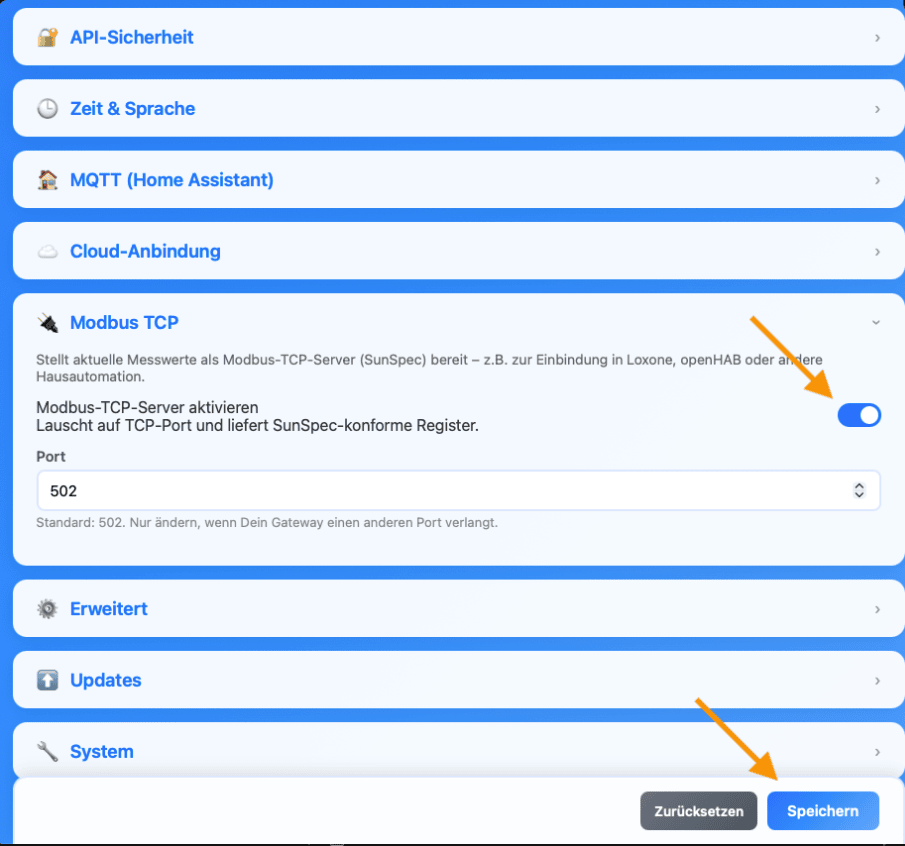
Via the web interface (recommended) — open the WattWächter in your browser, either via its mDNS name http://wattwaechter-XXXXXXXXXXXX.local or via its IP address, and click Settings. Expand the Modbus TCP section, switch Enable Modbus TCP server on and confirm with Save at the bottom.
The Port field is set to 502 and only needs changing if that port is already taken on your network.
Via the API Explorer — open the WattWächter web UI, click "API Explorer", select the POST /api/v1/settings endpoint and send this body:
{ "modbus": { "enable": true, "port": 502 } }
Via curl — if you'd rather do it from the command line:
curl -X POST http://wattwaechter-XXXXXXXXXXXX.local/api/v1/settings \
  -H "Authorization: Bearer WRITE_TOKEN" \
  -H "Content-Type: application/json" \
  -d '{
    "modbus": {
      "enable": true,
      "port": 502
    }
  }'
The change takes effect immediately — no reboot required. You can change the port if 502 is already in use.
API authentication disabled?
If API authentication is off (factory default), you can omit the Authorization header. See REST API.
Connection details
| Parameter | Value |
|---|---|
| Protocol | Modbus TCP |
| Port | 502 (configurable) |
| Supported function codes | 0x03 (Read Holding Registers), 0x04 (Read Input Registers) |
| Max. concurrent clients | 2 |
| Idle timeout | 5 minutes |
| Byte order | Big-endian (Modbus standard) |
| Register base | 40000 (SunSpec standard) |
Use the mDNS name (wattwaechter-XXXXXXXXXXXX.local) or the device's IP address as host. How to find the IP is described in the FAQ.
Loxone: IP address only
Not every client resolves mDNS. The Loxone Miniserver cannot handle .local
names — it needs the IP address, backed by a DHCP reservation or a static IP. Details
under Integrations → Loxone.
SunSpec register map
The address range starts at 40000 and contains three blocks:
| Address | Content | Size |
|---|---|---|
| 40000–40001 | SunSpec ID "SunS" (0x53756E53) |
2 registers |
| 40002–40069 | Model 1 — Common Block (manufacturer, model, serial, firmware) | 68 registers |
| 40070–40176 | Model 203 — Three Phase Meter (Wye) | 107 registers |
| 40177–40178 | End marker (0xFFFF, 0x0000) | 2 registers |
Unpopulated fields are marked with the SunSpec sentinel 0x8000 (int16) or 0xFFFF (uint16) as not implemented.
Model 1 — Common Block
| Field | Address | Type | Content |
|---|---|---|---|
| ID | 40002 | uint16 | 1 |
| L | 40003 | uint16 | 66 |
| Mn (Manufacturer) | 40004–40019 | string32 | SmartCircuits GmbH |
| Md (Model) | 40020–40035 | string32 | WattWaechter |
| Vr (Version) | 40044–40051 | string16 | Firmware version |
| SN (Serial Number) | 40052–40067 | string32 | MAC address (hex, 12 chars) |
| DA (Device Address) | 40068 | uint16 | 1 |
Model 203 — Three Phase Meter (Wye)
All measurement values use a scale factor (_SF) to fit into integer registers. The real value is:
value = raw × 10^SF
| Address | Description | Field | Type | Unit | SF | OBIS |
|---|---|---|---|---|---|---|
| 40070 | 203 |
ID | uint16 | — | — | — |
| 40071 | 105 |
L | uint16 | — | — | — |
| 40072 | Total current (computed) | A | int16 | A | A_SF | — |
| 40073 | Current L1 | AphA | int16 | A | A_SF | 1-0:31.7.0 |
| 40074 | Current L2 | AphB | int16 | A | A_SF | 1-0:51.7.0 |
| 40075 | Current L3 | AphC | int16 | A | A_SF | 1-0:71.7.0 |
| 40076 | Current scale factor (-2 → 0.01 A) |
A_SF | int16 | — | — | — |
| 40077 | LN voltage (average) | PhV | int16 | V | V_SF | — |
| 40078 | Voltage L1 | PhVphA | int16 | V | V_SF | 1-0:32.7.0 |
| 40079 | Voltage L2 | PhVphB | int16 | V | V_SF | 1-0:52.7.0 |
| 40080 | Voltage L3 | PhVphC | int16 | V | V_SF | 1-0:72.7.0 |
| 40085 | Voltage scale factor (-1 → 0.1 V) |
V_SF | int16 | — | — | — |
| 40086 | Grid frequency | Hz | int16 | Hz | Hz_SF | 1-0:14.7.0 |
| 40087 | Frequency scale factor (-2 → 0.01 Hz) |
Hz_SF | int16 | — | — | — |
| 40088 | Total active power | W | int16 | W | W_SF | 1-0:16.7.0 |
| 40089 | Power L1 | WphA | int16 | W | W_SF | 1-0:21.7.0 |
| 40090 | Power L2 | WphB | int16 | W | W_SF | 1-0:41.7.0 |
| 40091 | Power L3 | WphC | int16 | W | W_SF | 1-0:61.7.0 |
| 40092 | Power scale factor (1 → 10 W, firmware 1.2.0 and newer) |
W_SF | int16 | — | — | — |
| 40108–40109 | Total export | TotWhExp | acc32 | Wh | TotWh_SF | 1-0:2.8.0 |
| 40116–40117 | Total import | TotWhImp | acc32 | Wh | TotWh_SF | 1-0:1.8.0 |
| 40124 | Energy scale factor (0 → 1 Wh) |
TotWh_SF | int16 | — | — | — |
Data types
- int16 — 16-bit signed, 1 register. Negative for power export.
- acc32 — 32-bit unsigned accumulator, 2 registers (high word first).
The value range follows from the data type and the scale factor. With
W_SF = 1 the power registers cover roughly ±327 kW, the acc32 energy
counters roughly 4.29 GWh. Beyond that the device reports not implemented
(0x8000) rather than a clamped value — a clamped number would be
indistinguishable from a real reading.
Which registers are actually available?
Which fields are populated depends on what your smart meter sends. If it only provides the total import 1-0:1.8.0 and instantaneous power 1-0:16.7.0, the per-phase registers stay at not implemented (0x8000).
To check which registers currently hold valid values, query the status endpoint — GET on /api/v1/modbus/status returns a valid flag for each register:
# Show only invalid registers (not delivered by the meter)
curl -s http://wattwaechter-XXXXXXXXXXXX.local/api/v1/modbus/status \
  | jq '.registers[] | select(.valid == false)'
See the status endpoint section below for details.
Example access
Read total power (modpoll)
# Read register 40088 (W) — 1 register
modpoll -m tcp -a 1 -r 40088 -c 1 -t 3 wattwaechter-XXXXXXXXXXXX.local
Read total import (Python / pymodbus)
from pymodbus.client import ModbusTcpClient

client = ModbusTcpClient("wattwaechter-XXXXXXXXXXXX.local", port=502)
client.connect()

# TotWhImp: 2 registers starting at 40116 (acc32)
rr = client.read_holding_registers(address=40116, count=2, slave=1)
tot_wh_imp = (rr.registers[0] << 16) | rr.registers[1]

# Scale factor (TotWh_SF) from register 40124
sf = client.read_holding_registers(address=40124, count=1, slave=1).registers[0]
sf = sf if sf < 0x8000 else sf - 0x10000   # int16

kwh = tot_wh_imp * (10 ** sf) / 1000
print(f"Import: {kwh:.3f} kWh")

client.close()
Status endpoint
For testing and debugging, the REST API provides a live view of the Modbus state and every register the device serves — including the raw register content and the scale factor. A Modbus client (e.g. Loxone) can be configured from this response alone, without the SunSpec specification at hand:
curl http://wattwaechter-XXXXXXXXXXXX.local/api/v1/modbus/status \
  -H "Authorization: Bearer READ_TOKEN"
Response (abbreviated):
{
  "enabled": true,
  "running": true,
  "port": 502,
  "active_connections": 1,
  "registers": [
    { "register": 40073, "name": "AphA", "obis": "31.7.0",
      "value": 1.2300, "unit": "A", "valid": true,
      "raw": 123, "scale_factor": -2, "scale_register": 40076, "derived": false },
    { "register": 40086, "name": "Hz", "obis": "14.7.0",
      "value": null, "unit": "", "valid": false,
      "raw": -32768, "scale_factor": -2, "scale_register": 40087, "derived": false },
    { "register": 40088, "name": "W", "obis": "16.7.0",
      "value": -450.0000, "unit": "W", "valid": true,
      "raw": -45, "scale_factor": 1, "scale_register": 40092, "derived": false },
    { "register": 40116, "name": "TotWhImp", "obis": "1.8.0",
      "value": 12345600.0000, "unit": "Wh", "valid": true,
      "raw": 12345600, "scale_factor": 0, "scale_register": 40124, "derived": false },
    { "register": 40072, "name": "A", "obis": "",
      "value": 3.6900, "unit": "A", "valid": true,
      "raw": 369, "scale_factor": -2, "scale_register": 40076, "derived": true }
  ]
}
| Field | Description |
|---|---|
enabled |
Modbus server enabled in settings |
running |
Server task is up and listening on the port |
active_connections |
Current number of Modbus clients connected (max. 2) |
registers[].register |
Modbus address; acc32 values occupy two consecutive registers |
registers[].obis |
OBIS code of the meter value that populates the register — empty for computed values |
registers[].value |
Scaled value in unit; null if not available |
registers[].valid |
true if the meter delivers this value. Otherwise the register holds the sentinel 0x8000 (−32768) |
registers[].raw |
Register content exactly as a Modbus client reads it (int16, or acc32 as unsigned) |
registers[].scale_factor |
Decimal exponent: value = raw × 10^scale_factor |
registers[].scale_register |
Address of the SF register that publishes this factor over Modbus |
registers[].derived |
true for A (40072) and PhV (40077) — the device computes these from the phase values; they have no OBIS code |
The fields raw, scale_factor, scale_register and derived, as well as the entries
A and PhV, are available from firmware 1.2.0. Older firmware only lists the
OBIS-mapped registers with value, unit and valid.
Read the scale factor directly
If you configure a client by hand, take the factor from scale_factor instead of
guessing it: -45 × 10^1 = -450 W. The five SF registers themselves (A_SF, V_SF,
Hz_SF, W_SF, TotWh_SF) do not appear as rows of their own — otherwise every
client rendering the list would show them as sensors. scale_register tells you where
they live; the complete layout is in the register map.
See also the REST API.
Troubleshooting
Connection refused / timeout
- Is Modbus enabled in settings? Check
/api/v1/modbus/status→enabled: true,running: true. - Are you using the correct port? Default is 502.
- Is the client on the same network/subnet? Guest WiFi usually blocks client-to-client traffic.
- At most 2 concurrent connections are supported. Additional clients are rejected until a connection closes or times out after 5 min idle.
Registers only return 0x8000 / -32768
0x8000 is the SunSpec sentinel for not implemented. That means your smart meter doesn't provide this OBIS code. Check the dashboard to see which OBIS codes actually arrive — only those are written to the Modbus registers.
Values look off by 10x / 100x
The SunSpec scale factors (A_SF, V_SF, W_SF, Hz_SF, TotWh_SF) must be applied on every read. Example: current register AphA = 123 with A_SF = -2 means 1.23 A. True SunSpec clients (Home Assistant, evcc, openHAB modbus.sunspec, pymodbus with SunSpec parser) handle this automatically — generic Modbus clients (Loxone, modpoll) require you to do it yourself.
Port 502 already in use
Already running another device on port 502? Configure an alternative port, e.g. 1502:
curl -X POST http://wattwaechter-XXXXXXXXXXXX.local/api/v1/settings \
  -H "Authorization: Bearer WRITE_TOKEN" \
  -H "Content-Type: application/json" \
  -d '{"modbus": {"port": 1502}}'