Flashing the Controller
Only when necessary
This step is only required if the WattWächter was flashed with an alternative firmware and you want to return to the original firmware. New devices are shipped pre-flashed from the factory.
Activating Programming Mode
To flash the controller via USB, the WattWächter must be put into programming mode:
- Disconnect the WattWächter from the power supply
-
Open the housing
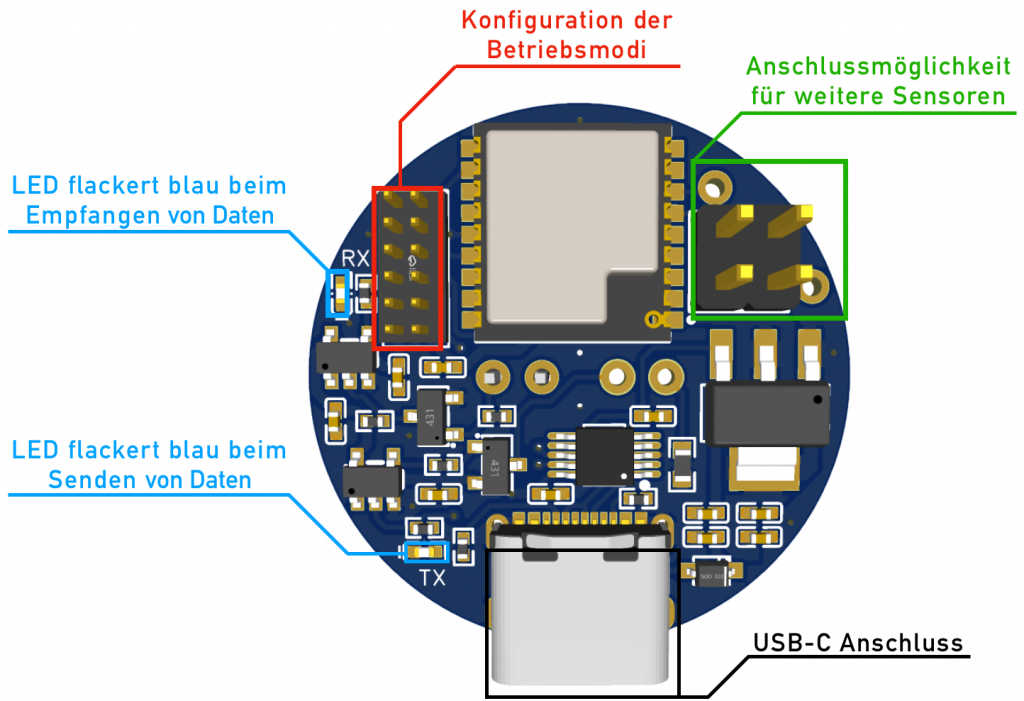
-
Set the jumpers according to the programming diagram:
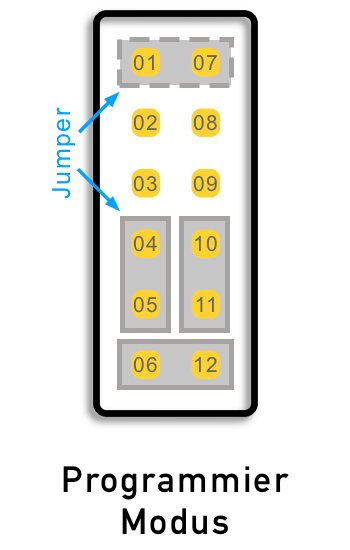
-
Briefly connect PIN 01 and 07 (using a jumper or metallic object)
- Connect the USB cable to the computer
- The device boots in flash mode – the connection between PIN 01 and 07 can now be removed
Web Flasher
The WattWächter WiFi/USB can be flashed directly from this page with the latest firmware. Click the button, select the USB port and follow the instructions:
Requirements
- Google Chrome or Microsoft Edge (other browsers do not support Web Serial)
- WattWächter in programming mode (see above) and connected via USB
After flashing
Don't forget to set the jumpers back to the desired operating mode after flashing.