Deep Sleep
Deep Sleep mode reduces the WattWächter's power consumption from approximately 75 mA during normal operation to about 5 mA. This enables significantly longer operation on a power bank.
Power bank auto-shutoff
Power banks sold in the EU typically have an auto-shutoff feature. This may deactivate the output at low power draw (5 mA in Deep Sleep) or only stay active above a minimum load (> 100 mA). Check whether your power bank is compatible with Deep Sleep mode.
Activating Deep Sleep
- Open the WattWächter's web interface
- Navigate to Tools → Console
- Enter the following command:
DeepSleepTime <seconds>
Example: DeepSleepTime 3600 – the WattWächter wakes up hourly at fixed times (10:00, 11:00, etc.)
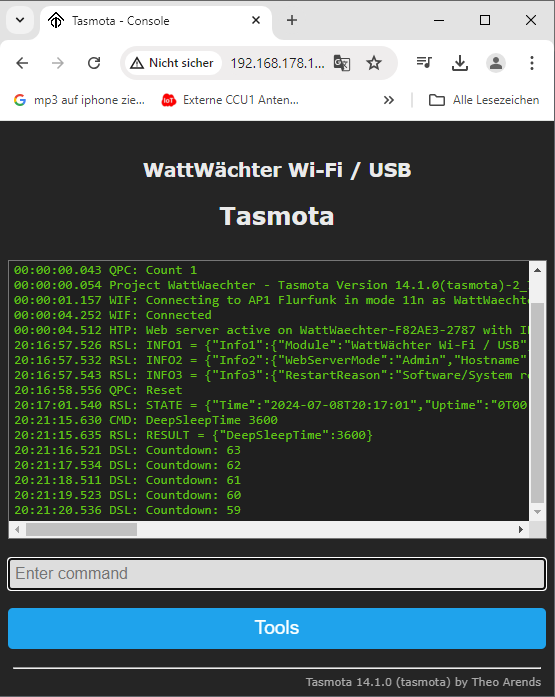
After entering the command, a 63-second countdown begins before the first Deep Sleep activates.
Configuring Wake Duration
The TELEPERIOD parameter controls how long the WattWächter stays active after waking up. During this time, it connects to Wi-Fi, synchronizes the clock, reads the meter data, and transmits it via MQTT.
Teleperiod 30
This command sets the active phase to 30 seconds.
Recommended value
A value of 30 seconds is a good compromise. Values that are too short (e.g., 10 s) may not allow enough time for all data to be transmitted. Values that are too long (e.g., 300 s) waste energy unnecessarily.
Deactivating Deep Sleep
To disable Deep Sleep:
- Briefly disconnect the power supply
- Reconnect it
- Open the Console within the 63-second window
- Enter:
DeepSleepTime 0